
M3U Playlists for Beginners
An M3U playlist is not a video — it is a text file listing TV channels. Here is what it contains and how to load one.
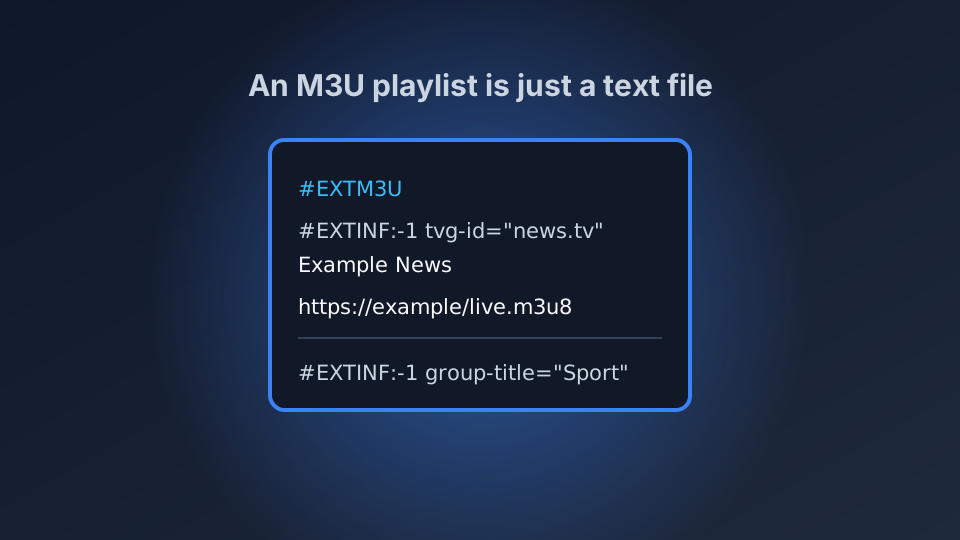
If you have heard the phrase "M3U playlist" and nodded along without really knowing what it meant, this is the guide that clears it up. An M3U file is not a video. It is a text file — a list — containing the addresses of TV channels. That is genuinely all it is, and once you understand that, loading one is a five-minute job in any decent player app.
This guide explains what the file actually contains, how to load one on your own device, and what to do when it does not work. No coding required.
What an M3U File Actually Is
An M3U playlist is a plain text file that lists channels. Each channel takes two lines: a description line starting with #EXTINF, and a line underneath holding the stream address (usually ending in .m3u8). Open one in Notepad and you can read every channel in it. That is not a trick — it is genuinely a text file, which is why the format is so easy to share, edit and repair.
The two common confusions: an M3U file is a list, not the video itself — the stream still comes over the internet. And an M3U file says nothing about whether it is legal; it is just a list. What matters is where the channel addresses in it come from, which we cover in the IPTV legality guide.
How to Load an M3U Playlist, Step by Step
Every IPTV player has the same basic flow, even though the menus look different. Pick your player first — our comparison of the best IPTV apps covers the options, and IPTV Smarters Pro or TiviMate are the usual starting points. Then:
Step 1. Open the player and choose to add a playlist. Look for "Load your playlist or file/URL".
Step 2. Choose one of two methods. Enter URL if you have a web address ending in .m3u or .m3u8. Choose File if somebody sent you an .m3u or .txt file directly and it is saved on your device.
Step 3. Paste the URL or pick the file, then confirm. Give it a name you will recognise.
Step 4. Wait a few seconds while the app reads the list. When the channels appear, you are done — open one and press play.
That is the whole process. On a Fire TV it takes slightly longer because of how the interface works, so we covered it separately in our Smart TV and Fire TV setup guide.
M3U vs Xtream Codes: Which Do You Ask For?
Providers hand out playlist access in two formats and the names confuse people constantly. An M3U playlist is that text file — a list of channel addresses, usually shared as a single link. Xtream Codes is a different system: you get a server address, a username and a password, and the app logs in and pulls the channels itself. Xtream is usually faster and gives a better guide, because the app is fetching fresh data rather than working from a static file. We compare the two in detail in M3U versus Xtream Codes — short version: if your provider offers both, use Xtream.
When an M3U Playlist Does Not Work
Almost every M3U problem is one of a short list of things. A paste that lost its last characters is the most common. A playlist file saved with the wrong line endings, or saved as a .txt when the player wants .m3u, is the second. Then come dead links — channel addresses that worked when the list was made and no longer do. If your list loads but every channel is a black screen, the problem is usually the stream addresses rather than the file, and there is nothing to fix in the playlist itself. Work through our twelve fixes for IPTV that is not working in order and you will usually find it in the first few minutes.
Free and Legal Playlists Exist
You do not have to pay for a playlist to see how this works, and you certainly do not need an unofficial one. Public-interest and free-to-air streams can be assembled into an entirely legal M3U, and the fastest way to find real free television is our guide to the best free legal live TV apps. If you would rather build one yourself from free sources, our guide to building your own M3U playlist walks through it line by line.
Conclusion
An M3U playlist is a text file listing TV channels. Load it in a player, and if something is broken it is nearly always a truncated link, the wrong file extension, or dead streams — all fixable. Start with a free, legal playlist to learn the mechanics, then decide whether a paid subscription is something you actually want.